Stop Being Your Parent's Unpaid IT Department
The Telehealth Parent Guide is a Remote Care System — not a tech manual that tells your parent which button to click, but a complete set of proxy access walkthroughs, device lockdown guides, troubleshooting flowcharts, and resistance scripts that lets you manage your aging parent's healthcare from anywhere. No more shouting "What do you see on the screen?" over the phone.
Your parent's next video visit doesn't have to be a disaster. Right now, you're the one who gets the panicked call 10 minutes before the appointment: the camera won't work, the audio is off, they accidentally closed the app, and the doctor is waiting. You've tried walking them through it over the phone. You've tried sticky notes. You've tried YouTube tutorials they can't follow. Nothing sticks — because the problem isn't your parent's intelligence. It's that nobody gave you a system.
Works for families in the US, UK, Canada, Australia, and New Zealand — with region-specific proxy access guides and portal walkthroughs for each country.
Is This For You?
This guide is for you — the adult son or daughter who:
- Has spent an hour on the phone trying to help a parent log into MyChart
- Has driven two hours for a 15-minute follow-up that could have been a video call
- Has a parent who "doesn't trust the computer" but needs regular check-ups
- Lives too far away to set things up in person every time
- Wants to access their parent's health portal legally — without sharing passwords
You know the tech. You use Zoom at work every day. But translating that competence to your 78-year-old parent's iPad — over the phone, from 500 miles away — is a completely different challenge. This guide bridges that gap.
What's Inside the Remote Care System
The Pre-Visit Checklist
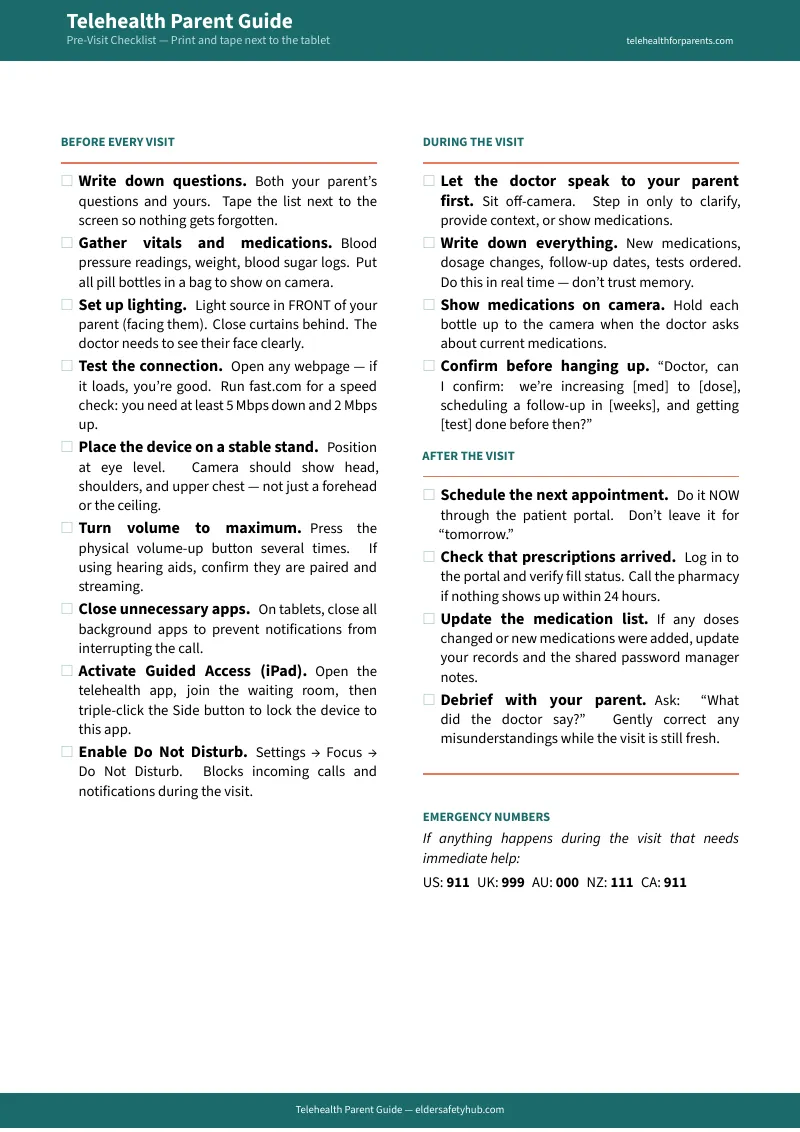
You can't be there the morning of the appointment to check the lighting, test the audio, and make sure the tablet is charged. This single large-print page — designed to tape next to the screen — walks your parent through the entire pre-visit routine without your help. Lighting, sound, camera angle, battery, connection. Ten minutes, no phone call required.
The Proxy Access Masterclass
Sharing passwords breaks the moment they change one. The real solution is legal proxy access — logging into their portal under your own credentials, from your own device. This section walks you through the exact process for MyChart Sharing Hub (US), NHS App Linked Profiles (UK), My Health Record Nominated Representative (AU), Manage My Health (NZ), and provincial portals (CA). Most hospitals bury this option three menus deep and never tell patients it exists.
Troubleshooting Flowcharts
The 45-minute phone call — "Can't hear the doctor? What do you see? No, the other button" — happens because neither of you has a decision tree. These printable flowcharts turn that call into 60 seconds: "Screen is black? Start here." "No audio? Start here." Your parent can follow them alone, or you can walk through them together without guessing.
The "Senior Mode" Device Setup
Your parent accidentally swiped into Settings mid-appointment and now the doctor is staring at a frozen screen. This section turns any iPad, Android tablet, or Echo Show into a locked-down telehealth kiosk — one app, one button, nothing to accidentally close. Uses built-in features (Guided Access, Screen Pinning, Drop In) so there's nothing to install or maintain.
Scripts for Resistant Parents
Telling your parent "you need to learn this" starts a fight. They hear "you think I'm stupid." These word-for-word scripts reframe the conversation — from "learn new technology" to "let me handle the technology for you" — so you bypass the resistance instead of arguing through it. Covers the "I'm too old," "I don't trust it," and "just drive me" objections.
The Emergency Tech Protocol
The tech will fail. Maybe not the first time, but eventually — mid-appointment, with the specialist waiting, and your parent panicking. This crisis plan tells both of you exactly what to do: backup connection options, how to call back into the visit, when to switch to phone-only, and how to get the appointment rescheduled without a no-show fee.
Remote Management Setup
Right now, when something breaks on their tablet, you can't see the screen and you can't fix it. This section sets up remote access tools so you can troubleshoot from your own device — plus a password manager so you're not managing their 12 healthcare logins on a sticky note.
What you'll download:
- The Telehealth Parent Guide (PDF, 13 chapters + 3 appendices)
- Pre-Visit Checklist (large-print, 1 page)
- Troubleshooting Flowcharts (printable, 4 pages)
- Proxy Access Tracker (fillable PDF)
- Device Setup Quick Cards (iPad, Android, Echo Show)
- Telehealth vs. ER Decision Card (large-print, 1 page)
After Reading This Guide, You'll Be Able To:
- Set up your parent's tablet so video visits launch with one tap
- Access their medical records legally through proxy access — no password sharing
- Hand them a single printed page that covers the entire pre-visit routine
- Troubleshoot audio, video, and connection issues from your own phone in under 2 minutes
- Have "the telehealth conversation" without triggering a fight
- Know what to do when the tech fails during a live appointment
Why This Works When "Just Google It" Doesn't
Free resources exist. Here's what they actually give you:
- Hospital portal guides (MyChart, NHS App) tell your parent how to click the login button. They don't cover lighting, audio, camera angle, or what to do when 2FA locks them out from a different time zone. They're platform-specific — if your parent sees two specialists at different hospitals, you're reading two completely different guides that don't talk to each other. And they're obsolete the moment the app updates.
- Government resources (AARP, HHS, NHS.uk) publish high-level overviews like "Telehealth for Older Adults" — policy summaries too broad to be actionable. They won't give you a printable checklist to tape next to the tablet, a flowchart for when the audio cuts out, or the specific steps to get proxy access approved at your parent's GP surgery.
- Etsy and Gumroad checklists ($5–$15) focus on appointment day — "test your camera, check your connection." They miss the entire ecosystem: proxy access setup, device lockdown, remote management, and what to do when your parent refuses to try it at all.
- Concierge tech support (Candoo Tech, Geek Squad) charges $228/year or $50–$90 per session — and they can't log into a patient portal, manage a medication list, or have the conversation with your parent about why video visits matter. They fix the device. They don't fix the system.
This guide combines all of it — portal access, device setup, troubleshooting, resistance scripts, and crisis protocols — into one Remote Care System you can set up in a weekend.
Built for 2026
Updated for the latest Medicare telehealth rules (extended through 2026), NHS App Linked Profiles, Canada's Connected Care Act, and Australia's Nominated Representative changes. Healthcare is going digital-first — every major system now has a "digital front door." This guide makes sure your parent doesn't get locked out.
— Less Than One Specialist Co-Pay
Compare it to:
- Concierge tech support for seniors: $228/year
- The gas to drive to their house and back: $30+
- A missed appointment "no-show" fee: $50+
- The half-day of work you take off to drive them: priceless
30-day money-back guarantee. If this doesn't save you time and stress, you pay nothing.
The next video visit is coming. Set up the system this weekend — so the tech works and you can focus on what actually matters: their health.