What Would Happen to Your Parent's Digital Life Tomorrow If They Couldn't Manage It Themselves?
The Digital Legacy Kit is your family's Break Glass Plan — a complete, printable system to organize your aging parent's passwords, accounts, subscriptions, and digital wishes before an emergency forces you to figure it out alone.
You know you should organize it. You just don't know where to start. There are 50+ accounts, half a dozen devices, passwords scribbled on Post-it Notes, and a phone that requires a PIN you've never been told. Meanwhile, your parent tells you "it's all fine" and changes the subject.
Here's what families actually face: When a parent dies or becomes incapacitated, the adult child enters a "digital scavenger hunt" — guessing passwords, calling bank helplines, filing court orders with Google, and watching subscriptions drain the bank account month after month. Apple's Legacy Contact feature? It explicitly excludes access to stored passwords. A will? It takes months to probate, and by then, the email account may be deactivated and the photos gone forever.
Covers families in the US, UK, Canada, Australia, and New Zealand — with country-specific legal notes and platform guidance for each.
Is This For You?
This guide is for you — the adult son or daughter who:
- Acts as the unpaid IT support for a parent who "doesn't do technology"
- Has no idea how many online accounts your parent actually has
- Worries about what would happen to their photos, email, and bank accounts in an emergency
- Has tried to bring up "the talk" but gets shut down or told you're being morbid
- Wants a system — not just a blank notebook to scribble passwords in
You're not just buying a PDF. You're getting 8 printable PDFs — a complete guide plus 7 standalone reference cards, checklists, and templates — and buying back the 40+ hours you'd spend scouring Google, Facebook, Apple, and every bank's help page to figure out their legacy policies — many of which change annually.
What's Inside the Break Glass Plan
- Complete Account Inventory Templates — because the average senior has 50–100+ accounts and without a structured inventory, families spend months guessing which ones even exist. Not a blank notebook — a guided system organized by category (banking, healthcare, email, subscriptions, crypto, smart home) with fields for 2FA method, password location, and what to do at death.
- Platform Legacy Setup Guide — because Google, Apple, and Facebook each have legacy tools that legally override your will — but none of them tell you about the others. Step-by-step instructions for every major platform, what each tool does, what it doesn't cover, and the workaround. Also a standalone 2-page printable — work through it at the computer.
- Conversation Scripts & Objection Handlers — because "we should organize your passwords" sounds like "I think you're dying" to most parents. Word-for-word scripts that frame it as emergency preparedness, plus responses to the 4 objections you'll actually hear: "I'm not dying," "That's private," "I'll get to it later," and "My kids can figure it out." Also a standalone printable — keep it in your back pocket before a family visit.
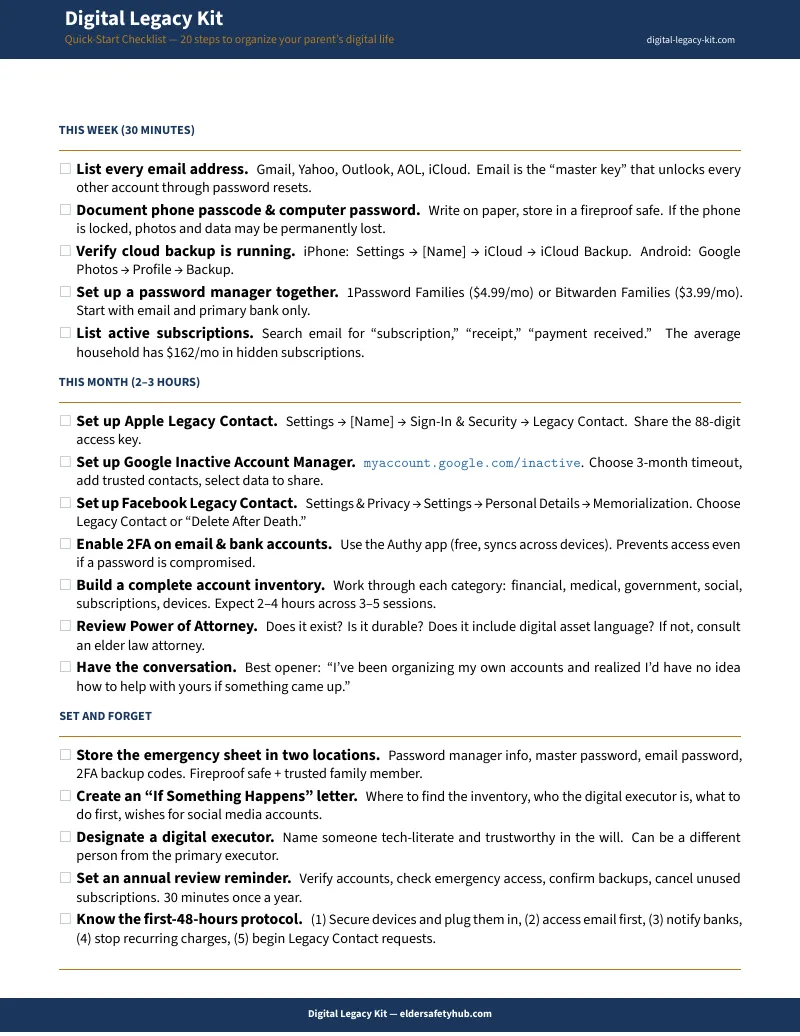
- First-48-Hours Emergency Protocol — because banks freeze accounts on notification, subscriptions keep billing, and WhatsApp auto-deletes accounts after 120 days of inactivity. A time-sequenced action plan so you know what to do first, second, third — not a frantic Google search at 2 AM. Standalone 1-page printable.
- Device Access Quick Reference — because password managers don't cover device PINs, and without the passcode, a modern iPhone is permanently locked — Apple can't unlock it, even with a court order. Covers phones, computers, tablets, drives, and smart home devices. Standalone 1-page crisis card.
- "If Something Happens" Letter Template — because the best plan in the world is useless if nobody can find it. A fillable 1-page letter to store with your important documents: where everything is, who to contact, what to do first, and your parent's wishes for their digital accounts.
- Annual Review Checklist — because accounts change, passwords rotate, and the platform you set up Legacy Contact on last year might have changed its policies. A structured annual review so the plan stays current. Standalone 1-page printable.
What you'll download — 8 printable PDFs:
- The Digital Legacy Kit Guide (comprehensive walkthrough)
- Account Inventory Worksheets (organized by category)
- Conversation Scripts & Objection Handlers (1-2 pages)
- Platform Legacy Setup Guide (2 pages)
- First-48-Hours Emergency Checklist (1 page)
- "If Something Happens" Letter Template (fillable, 1 page)
- Device Access Quick Reference (1 page)
- Annual Review Checklist (1 page)
Every standalone PDF works on its own — hand the conversation scripts to a sibling, store the emergency protocol in a binder, fill in the letter template tonight. No need to read the full guide first.
After Reading This Guide, You'll Be Able To:
- Create a complete inventory of your parent's digital accounts in a single weekend
- Set up legacy contacts and inactive account managers on every major platform
- Have "the conversation" using scripts that avoid defensiveness and arguments
- Know exactly what to do — and in what order — in the first 48 hours of an emergency
- Store credentials securely using the hybrid paper + digital method (no app required)
- Stop worrying that your family's photos, emails, and memories could vanish overnight
Why This Works When Other Approaches Don't
A notebook is a single point of failure. If it's stolen, they have the keys to everything. If the house burns down, the legacy is lost. And a notebook doesn't tell you which accounts need legacy contacts, how to handle 2FA when the phone is locked, or what your parent wants done with their social media.
Password managers store credentials but can't tell you which accounts exist, can't stop subscriptions from billing a deceased parent's credit card, and can't help you bring up the topic at Thanksgiving. If your parent forgets the master password — increasingly common with cognitive decline — the vault is cryptographically sealed forever.
Digital vault subscriptions like Everplans ($100/year) and GoodTrust ($149) require your parent to log in, trust "the cloud" with their banking details, and keep paying indefinitely. Most seniors refuse. And if the company shuts down — two digital vault services have already closed in the past two years — your data goes with them.
Etsy templates give you blank forms for a few dollars. No guidance on why you need to set up Google Inactive Account Manager before anything else, no scripts for the conversation, no country-specific legal notes. Just empty boxes.
The Break Glass Plan is the strategic layer above any individual tool. It tells you which tools to use, where, and when — and provides the templates, scripts, and step-by-step guidance to actually get it done.
— Less Than a Single Hour with an Estate Attorney
Compare it to:
- An estate planning attorney: $1,500+ (and they won't organize a single password)
- Digital vault subscriptions: $75–$150/year (and your parent has to trust "the cloud")
- The cost of hiring a forensic IT specialist after a death: $200+/hour
- The cost of not having a plan: months of stress, lost memories, drained accounts
. One-time purchase. No subscription. No platform to sign up for. A PDF you download, own forever, and can print tonight.
30-day money-back guarantee. If this doesn't bring you peace of mind, you pay nothing.
The Senior Safety Bundle
Organizing their digital legacy is half the battle. Protecting them from scammers right now is the other half.
Pair the Digital Legacy Kit with the Elder Scam Shield — printable scripts, checklists, and a family code word system that teaches your parent to hang up on scammers. Together, you organize their past and secure their present.
Every day without a Break Glass Plan is another day your family's digital history is at risk. Get the Digital Legacy Kit now — start this weekend, finish by Sunday.